Category: Technology

  • Castle App: Key Advantages and Potential Drawbacks

    Castle App: Key Advantages and Potential Drawbacks

    Castle App is a software solution designed to enhance security and user authentication for online platforms. Its primary advantage lies in its ability to provide robust protection against fraudulent activities by analyzing user behavior and detecting anomalies in real time. This proactive approach helps businesses reduce the risk of account takeovers, unauthorized access, and other cyber threats that can compromise sensitive data. By integrating Castle App into their systems, companies benefit from advanced machine learning algorithms that continuously adapt to emerging fraud patterns, ensuring ongoing protection without requiring constant manual updates.

    Another significant benefit of Castle App is its seamless integration with existing applications and infrastructure. The app offers flexible APIs that allow developers to incorporate security features without extensive modifications or downtime. This ease of integration makes it suitable for a wide range of industries, including finance, e-commerce, healthcare, and more. Users experience minimal disruption during the implementation process while gaining immediate improvements in account security measures. Additionally, castle app supports multi-factor authentication options tailored to different risk levels detected during login attempts or transactions. This adaptive authentication enhances both security and user convenience by applying stricter verification only when suspicious activity is identified.

    Castle App also provides detailed analytics and reporting tools that help organizations monitor security events effectively. These insights enable IT teams to identify trends in attack methods and adjust their defensive strategies accordingly. The transparency offered by such reports fosters better communication between technical staff and management regarding cybersecurity posture and resource allocation decisions.

    Despite these advantages, there are potential drawbacks associated with using Castle App that should be considered before adoption. One concern involves privacy implications due to the collection of behavioral data required for accurate fraud detection. Organizations must ensure compliance with relevant data protection regulations such as GDPR or CCPA when implementing this technology to avoid legal complications related to user consent or data handling practices.

    Another limitation relates to false positives generated by the system’s risk assessment algorithms. While adaptive authentication reduces unnecessary friction for legitimate users most of the time, occasional misclassifications may lead to inconvenience or frustration if users are prompted for additional verification unnecessarily.

    Furthermore, smaller businesses might find the cost structure challenging since advanced security solutions like Castle often involve subscription fees based on usage volume or number of protected accounts.

    In conclusion, Castle App offers strong benefits through enhanced fraud prevention capabilities coupled with easy integration options and insightful analytics; however, potential issues around privacy concerns, false positives, and affordability should be carefully weighed during decision-making processes concerning its deployment within an organization’s cybersecurity framework.

  • MacBook Neo 2026 Review

    MacBook Neo 2026 Review

    Why the Neo Is Turning Heads

    Apple’s newest entry‑level laptop, the MacBook Neo, feels like a surprise party for anyone who thought budget‑friendly meant cheap‑feel. Powered by the same A18 Pro silicon that runs the iPhone 16 Pro, the 13‑inch Neo delivers a smooth, responsive experience that belies its $599 starting price. The Liquid Retina screen, solid aluminum chassis and a 16‑hour battery life make it a compelling option for students, freelancers and anyone who wants a “real” Mac without the flagship price tag.

    What the Neo Gets Right

    • Performance that surprises: Six‑core CPU, five‑core GPU and a 16‑core Neural Engine keep web browsing, video calls and even light video editing buttery smooth.
    • Premium build: The aluminum body feels sturdy and premium, a rare find at this price point.
    • Vivid display: 500 nits, P3‑wide color and a 2408 × 1506 resolution give the 13‑inch screen a crisp, lively look that outshines most competitors.
    • Value‑focused pricing: At $599 (or $899 for the higher‑spec model) the Neo offers a lot more than the typical budget laptop.

    Where the Neo Falls Short

    • Port scarcity: One USB‑C port with full 10 Gbps/DisplayPort speed and a second USB‑C limited to USB 2.0, plus a single USB‑A 2.0. No Thunderbolt, no MagSafe.
    • No backlit keyboard: Typing in dim lighting becomes a chore without the little white glow.
    • Modest base storage: 256GB SSD and 8GB of unified memory are fine for everyday tasks but may feel tight for power users.

    Core Specs at a Glance

    Feature Detail
    Chip Apple A18 Pro (6‑core CPU, 5‑core GPU, 16‑core Neural Engine)
    Memory 8 GB unified (non‑upgradeable)
    Storage 256 GB or 512 GB SSD
    Display 13‑inch Liquid Retina, 2408 × 1506, 500 nits, P3
    Battery 36.5 Wh, up to 16 hrs video playback
    Ports USB‑C (10 Gbps/DP), USB‑C (USB 2.0), USB‑A 2.0, headphone jack
    Connectivity Wi‑Fi 6E, Bluetooth 6.0
    Colors Silver, Blush, Citrus, Indigo

    The Charger Showdown: 20W vs. 35W

    Apple ships the Neo with a 20 W USB‑C Power Adapter (except in the UK/EU, where it arrives charger‑free). In a side‑by‑side test by ChargerLAB, the stock charger tops out at roughly 18W of input power. Switch to Apple’s 35W Dual‑Port Compact Power Adapter, priced at $59 and the Neo climbs to a solid 30W charging rate.

    The difference isn’t just a number on a spec sheet. Users can expect to shave 20–30 minutes off a full charge cycle, turning a sluggish overnight top‑up into a quick coffee‑break boost. The 35 W unit is the sweet spot: it’s fast enough to notice, compact enough to travel with and far cheaper than Apple’s high‑wattage behemoths.

    Bigger Isn’t Better: Why 96W and 140W Won’t Help

    Apple also sells 96W and 140W USB‑C adapters for its higher‑end MacBooks. Plugging either into the Neo yields the same 30W ceiling seen with the 35W charger. The laptop’s internal power‑management circuitry simply can’t draw more than it’s designed to, making those pricey adapters overkill for the Neo.

    Alternatives Worth Considering

    If you’re willing to look beyond Apple, several third‑party 30W plus chargers, such as those from Campad Electronics, hit the same 28–30W sweet spot at a lower price point. Just verify they support USB‑PD and deliver stable power; the Neo is forgiving, but a poorly regulated charger can hurt longevity.

    Bottom Line

    The MacBook Neo proves that Apple can deliver a respectable, premium‑feeling laptop without demanding a premium price. While it isn’t “fast‑charge capable” on paper, pairing it with Apple’s 35 W Dual‑Port Compact Power Adapter (or a reliable third‑party equivalent) unlocks the fastest charging experience the Neo will ever see. The result? A laptop that fills the gap between entry‑level price and genuine Mac performance, with a charging solution that’s fast enough to keep up with a busy day.

    FAQs

    What processor powers the MacBook Neo?

    The A18 Pro chip with a six‑core CPU, five‑core GPU and 16‑core Neural Engine.

    How much RAM does the Neo have and can it be upgraded?

    It comes with 8 GB of unified memory, which is soldered and not upgradeable.

    What storage options are available?

    256GB or 512GB SSD configurations.

    What is the display specification?

    13‑inch Liquid Retina, 2408 × 1506 resolution, 500 nits brightness, P3‑wide color gamut.

    How long does the battery last?

    Up to 16 hours of video playback on the 36.5Wh battery.

    Which ports are included?

    One USB‑C (10 Gbps/DisplayPort), one USB‑C limited to USB 2.0, one USB‑A 2.0 and a headphone jack. No Thunderbolt or MagSafe.

    Does the Neo have a backlit keyboard?

    No, the keyboard is not backlit.

    What are the color choices?

    Silver, Blush, Citrus and Indigo.

    What charger comes in the box?

    A 20W USB‑C Power Adapter (UK/EU models are charger‑free).

    How does the 35W Dual‑Port Compact Power Adapter improve charging?

    It raises charging power to about 30W, shaving 20–30 minutes off a full charge compared to the 20W charger.

    Will using a 96W or 140W Apple charger charge the Neo faster?

    No. The Neo’s internal power‑management caps charging at ~30W, so higher‑wattage adapters provide no benefit.

    Are third‑party chargers a viable alternative?

    Yes. Reliable USB‑PD chargers rated 30W or higher (e.g., Campad Electronics) work similarly to Apple’s 35W adapter.

    What Wi‑Fi and Bluetooth standards does the Neo support?

    Wi‑Fi 6E and Bluetooth 6.0.

    Is the storage expandable after purchase?

    No, the SSD is soldered and not user‑replaceable.

    How does the Neo’s performance compare to higher‑end Macs?

    It offers smooth everyday performance and light video editing, but it’s less powerful than flagship MacBook Pro models with higher‑core CPUs/GPUs.

    What is the price point for the base and higher‑spec models?

    $599 for the base model (256 GB SSD) and $899 for the upgraded model (512 GB SSD).

  • Why NBN Power Cords Go Missing And How to Get Them Back on Track

    Why NBN Power Cords Go Missing And How to Get Them Back on Track

    The Usual Suspects: How a Power Cord Disappears

    People lose their NBN power cord far more often than they’d like to admit. The most common culprits are simple, everyday moments that turn into a mini‑mystery:

    • Misplacement during a move: Even though these NBN power cords should not be moved from their original location, boxes get shuffled, drawers emptied, and that 8‑pin adapter ends up under a sofa or in a “junk drawer” that never sees the light of day.
    • Accidental disposal: When cords get tangled with old chargers, they’re often mistaken for e‑waste and tossed out with the rubbish.
    • Pet or rodent damage: A curious cat or a chewing mouse can gnaw through the cable, rendering it useless and prompting a quick discard.
    • Electrical mishaps: Power surges, accidental drops, or general wear can fry the adapter, leaving you with a dead piece of plastic.
    • Mistaking it for another charger: The NBN’s 12 V 2.5 A plug looks a lot like other DC adapters, so it’s easy to pack it with the wrong gear.
      All of these scenarios share one thing: the cord vanishes just when you need it most.

    The Real Cost of Losing the Cord

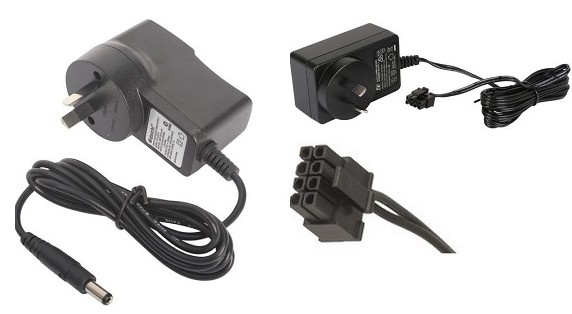
    The NBN power supply isn’t just any charger. It’s a 12 V DC, 2.5 A unit with a distinctive 8‑pin Molex‑style connector that powers the Network Termination Device (NTD) for FTTP connections. Because it’s property of NBN and tied to the address, you can’t simply take it when you move. Losing it means:

    • No power to the NTD → no internet.
    • Potential downtime while you hunt for a replacement.
    • The risk of buying a mismatched adapter that could damage the box.

    Quick Fixes: Getting a Replacement Without the Headache

    1. Contact Your ISP: Most ISPs (Telstra, Optus, Aussie Broadband, etc.) can arrange a genuine replacement. It’s often the fastest route, especially if you’re still under a service agreement.
    2. Check the Manufacturer’s Site: Identify the NTD model, Arris CM8200, Cisco or another and head to the maker’s support page. They usually list the exact part number for the power supply.
    3. Buy a Compatible Third‑Party Unit: If you prefer to order yourself, look for a 12 V 2.5 A adapter with the 8‑pin connector. Reputable Australian suppliers such as Campad Electronics, Wiltronics, and Aus Electronics Direct stock the exact spec.
    4. Use a Universal Adapter (With Caution)
      A universal DC adapter can work, provided you set it to 12 V and select a tip that matches the 8‑pin layout. Double‑check the polarity and amperage before plugging it in – a mismatch can fry the NTD.
    5. Search Online Marketplaces
      Amazon Australia and eBay have listings titled “NBN power supply” or “NBN 8‑pin power adapter”. Stick to sellers with solid ratings and verify that the product description lists 12 V, 2.5 A, 8‑pin.

    Prevention: Keep the Cord Where It Belongs

    • Designate a NBN shelf: Store the power supply with the NTD and any other NBN equipment. A labelled bin makes it easy to spot.
    • Label the cordL A simple “NBN Power 12 V 2.5 A” sticker saves future you from confusion.
    • Protect from pets: Keep the adapter out of reach of cats, dogs and rodents. A short cable management sleeve can deter chewing.
    • Document the specs: Write down the voltage, current and connector type in a home‑tech inventory. When the time comes to replace it, you’ll know exactly what you need.

    Bottom Line

    Losing the NBN power cord is a common, frustrating hiccup that can bring your internet to a halt. The fix is straightforward: confirm the 12 V / 2.5 A, 8‑pin spec, then either request a replacement from your ISP, order a matching unit from a trusted electronics supplier, or, if you’re comfortable, use a verified universal adapter. And next time you’re tidying up, give that little adapter a proper home, it’ll thank you by keeping the NTD humming and your broadband alive.

  • AI and the Future of Business Process Outsourcing

    AI and the Future of Business Process Outsourcing

    The integration of Artificial Intelligence (AI) into Business Process Outsourcing (BPO) is transforming the landscape of how companies manage and optimize their operations. Traditionally, BPO has relied heavily on human labor to handle repetitive and time-consuming tasks such as customer service, data entry, and back-office functions. However, with advancements in AI technologies like machine learning, natural language processing, and robotic process automation (RPA), the future of BPO is poised for a significant evolution that promises increased efficiency, reduced costs, and enhanced service quality.

    AI enables automation of routine processes that were once dependent on manual intervention. For instance, chatbots powered by natural language processing can handle vast volumes of customer inquiries simultaneously without fatigue or delay. This not only improves response times but also allows human agents to focus on more complex and value-added activities requiring emotional Artificial Intelligence or critical thinking. Moreover, AI algorithms can analyze large datasets rapidly to identify patterns and trends that inform better decision-making within outsourced services.

    One key benefit AI brings to BPO is scalability. Businesses often experience fluctuating demand for outsourcing services depending on market conditions or seasonal cycles. Traditional models require hiring or downsizing staff accordingly-a process both costly and time-intensive. In contrast, AI-driven systems can scale operations up or down seamlessly by adjusting computational resources rather than relying solely on workforce changes. This flexibility provides companies with greater agility in managing operational costs while maintaining consistent service levels.

    Additionally, AI enhances accuracy by minimizing human errors common in data-intensive tasks such as invoice processing or compliance reporting. Automated workflows governed by intelligent algorithms ensure standardized procedures are followed meticulously every time. The reduction in mistakes not only saves money associated with error correction but also builds trust between clients and outsourcing providers through reliable delivery outcomes.

    Despite these advantages, the adoption of AI in BPO also raises challenges related to workforce transformation and ethical considerations. As automation takes over mundane jobs traditionally performed by humans, there is a pressing need for reskilling employees so they can transition into roles involving oversight of AI tools or specialized problem-solving functions that machines cannot replicate easily. Furthermore, ensuring transparency in how AI systems make decisions becomes crucial to avoid biases that could affect fairness in customer interactions or hiring practices within outsourcing firms.

    In conclusion, the fusion of AI with Business Process Outsourcing heralds a new era characterized by smarter automation capabilities capable of driving operational excellence at scale. Companies embracing this technological shift stand to gain competitive advantages through improved productivity and innovation while redefining the role of human talent toward higher-value contributions within outsourced engagements. As this trend continues evolving rapidly across industries worldwide, strategic investment in both technology infrastructure and workforce development will be essential for maximizing the potential benefits offered by AI-powered BPO solutions now and into the future.

  • AI Tools Every Business Owner Should Know

    In today’s rapidly evolving digital landscape, artificial intelligence (AI) has become an indispensable asset for businesses aiming to enhance efficiency, improve decision-making, and gain a competitive edge. For business owners looking to leverage technology without extensive technical expertise, AI tools offer practical solutions that streamline operations and foster growth. Understanding some of the most effective AI tools available can significantly transform how businesses operate.

    One of the most widely used AI applications is in customer service through chatbots. Tools like Drift and Intercom utilize natural language processing (NLP) to engage with customers in real-time, providing instant responses to common queries while freeing up human agents for more complex issues. This not only improves customer satisfaction but also reduces operational costs by automating repetitive tasks.

    Marketing automation platforms powered by AI are another game-changer. Tools such as HubSpot and Marketo analyze consumer behavior patterns to personalize email campaigns, optimize ad targeting, and predict future trends. These insights help business owners allocate their marketing budgets more effectively and increase conversion rates by delivering tailored content that resonates with their audience.

    For sales teams, AI-driven CRM systems like Salesforce Einstein offer predictive analytics that identify promising leads based on historical data. By prioritizing prospects who are more Artificial Intelligence likely to convert, sales professionals can focus their efforts efficiently and close deals faster. Additionally, these systems provide valuable recommendations on upselling or cross-selling opportunities.

    Inventory management is critical for retail and manufacturing businesses; here AI plays a crucial role as well. Solutions such as TradeGecko use machine learning algorithms to forecast demand accurately, manage stock levels in real-time, and automate reorder processes. This minimizes the risk of overstocking or running out of essential products while optimizing supply chain operations.

    Financial management benefits from AI-powered tools too. Platforms like QuickBooks leverage automation for bookkeeping tasks including invoicing, expense tracking, and financial reporting with enhanced accuracy compared to manual methods. Furthermore, fraud detection algorithms embedded within these systems help safeguard company assets by identifying suspicious transactions promptly.

    Human resources departments increasingly rely on AI-based recruitment software like HireVue or Pymetrics that assess candidate suitability through video interviews analyzed by emotion recognition technologies or gamified assessments measuring cognitive abilities and personality traits. Such innovations reduce unconscious bias during hiring while accelerating the selection process.

    Moreover, project management applications integrated with AI capabilities-such as Monday.com or Asana-assist managers in resource allocation by predicting potential bottlenecks based on past project data. They enable better planning which leads to timely delivery of projects within budget constraints.

    In conclusion, embracing these diverse AI tools allows business owners across industries to automate mundane tasks effectively while gaining deeper insights into various aspects of their operations-from marketing strategies to financial health-ultimately driving smarter decisions that fuel sustainable growth in an increasingly competitive marketplace.