The Usual Suspects: How a Power Cord Disappears
People lose their NBN power cord far more often than they’d like to admit. The most common culprits are simple, everyday moments that turn into a mini‑mystery:
- Misplacement during a move: Even though these NBN power cords should not be moved from their original location, boxes get shuffled, drawers emptied, and that 8‑pin adapter ends up under a sofa or in a “junk drawer” that never sees the light of day.
- Accidental disposal: When cords get tangled with old chargers, they’re often mistaken for e‑waste and tossed out with the rubbish.
- Pet or rodent damage: A curious cat or a chewing mouse can gnaw through the cable, rendering it useless and prompting a quick discard.
- Electrical mishaps: Power surges, accidental drops, or general wear can fry the adapter, leaving you with a dead piece of plastic.
- Mistaking it for another charger: The NBN’s 12 V 2.5 A plug looks a lot like other DC adapters, so it’s easy to pack it with the wrong gear.
All of these scenarios share one thing: the cord vanishes just when you need it most.
The Real Cost of Losing the Cord
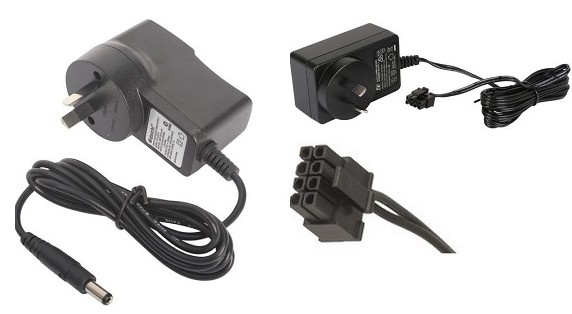
The NBN power supply isn’t just any charger. It’s a 12 V DC, 2.5 A unit with a distinctive 8‑pin Molex‑style connector that powers the Network Termination Device (NTD) for FTTP connections. Because it’s property of NBN and tied to the address, you can’t simply take it when you move. Losing it means:
- No power to the NTD → no internet.
- Potential downtime while you hunt for a replacement.
- The risk of buying a mismatched adapter that could damage the box.
Quick Fixes: Getting a Replacement Without the Headache
- Contact Your ISP: Most ISPs (Telstra, Optus, Aussie Broadband, etc.) can arrange a genuine replacement. It’s often the fastest route, especially if you’re still under a service agreement.
- Check the Manufacturer’s Site: Identify the NTD model, Arris CM8200, Cisco or another and head to the maker’s support page. They usually list the exact part number for the power supply.
- Buy a Compatible Third‑Party Unit: If you prefer to order yourself, look for a 12 V 2.5 A adapter with the 8‑pin connector. Reputable Australian suppliers such as Campad Electronics, Wiltronics, and Aus Electronics Direct stock the exact spec.
- Use a Universal Adapter (With Caution)
A universal DC adapter can work, provided you set it to 12 V and select a tip that matches the 8‑pin layout. Double‑check the polarity and amperage before plugging it in – a mismatch can fry the NTD. - Search Online Marketplaces
Amazon Australia and eBay have listings titled “NBN power supply” or “NBN 8‑pin power adapter”. Stick to sellers with solid ratings and verify that the product description lists 12 V, 2.5 A, 8‑pin.
Prevention: Keep the Cord Where It Belongs
- Designate a NBN shelf: Store the power supply with the NTD and any other NBN equipment. A labelled bin makes it easy to spot.
- Label the cordL A simple “NBN Power 12 V 2.5 A” sticker saves future you from confusion.
- Protect from pets: Keep the adapter out of reach of cats, dogs and rodents. A short cable management sleeve can deter chewing.
- Document the specs: Write down the voltage, current and connector type in a home‑tech inventory. When the time comes to replace it, you’ll know exactly what you need.
Bottom Line
Losing the NBN power cord is a common, frustrating hiccup that can bring your internet to a halt. The fix is straightforward: confirm the 12 V / 2.5 A, 8‑pin spec, then either request a replacement from your ISP, order a matching unit from a trusted electronics supplier, or, if you’re comfortable, use a verified universal adapter. And next time you’re tidying up, give that little adapter a proper home, it’ll thank you by keeping the NTD humming and your broadband alive.